Flightradar24
Charles Sharkey - 14th of Jul, 2020
FlightRadar24 also access to a smartphone, computer, or tablet with an internet connection.
Charles Sharkey - 14th of Jul, 2020
FlightRadar24 also access to a smartphone, computer, or tablet with an internet connection.
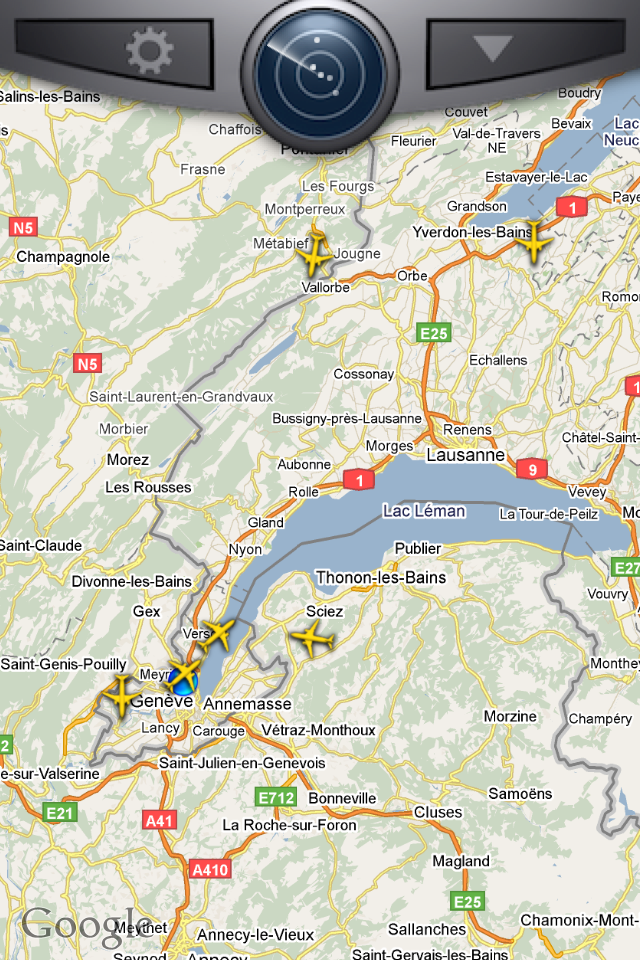
Flight radar 24 is an iphone app that allows you to see where aircraft are on google maps. It shows the callsign, registration, altitude and a lot more. It is a fun app for plane spotters. [caption id=“attachment_1326” align=“aligncenter” width=“200” caption=“Planes approaching Geneva airport”]
[/caption] Sit on a city roof or at the top of a mountain and as you see a plane fly above you you will know where it’s coming from and where it’s going. Next time I have to pick someone up at the airport I will be using the flight tracker to know exactly where the plane is. Boredom will be of a different type. [caption id=“attachment_1327” align=“aligncenter” width=“200” caption=“Flight information”]
[/caption] The information about what the plane is doing is quite complete. The only thing missing would be a live radio feed of the ATC communications.
Glympse is a real time location software that allows you to share your location with twitter, facebook, by e-mail or via a number of other social networks. It is simple and intuitive to use. Connect your facebook, twitter and other services with the application. When you are heading to work or to the mountains for a ski trip you can start to share your location in real time. You can set the amount of time that the location is shared. This is better than google latitude, foursquare and other services because it requires nothing from the receiver of this location sharing offer. Instead they simply click a link and they are kept up to date with your location progress. The flexibility of this service gives the user good control therefore fearing for your privacy is not so relevant. What I would like to see in future versions is the ability to play back the route we have taken. I would like to playback the train trip from one city in Switzerland for example.
A short helicopter flight to a mountain refuge in Aosta, on the Italian side of the Mt Blanc. Good fun, walk to the glacier and back. I also tested my Iphone 4 phone.
[flickr-gallery mode=“photoset” photoset=“72157624937122156”]
Designers must understand that user interface as well as ease of use are the two most important features of any electronics device. The more intuitive the device the more likely people are to keep using it. As a first generation Ipod touch user and an iphone 3gs owner I see the value of simple, intuitive confident design. Looking at the itablet (ipad) what I see in this design are three key qualities, ergonimcs, ease of use and versatility. All of these combined make this device one of the most interesting on the market at the moment. The smooth, slick design reminds us of the macbook air but without the keyboard. As it is a laptop we will expect less from it but get more out. The macbook air is running the same OS as the Macbook Pro therefore we expect it to do the same things but when it cannot then we say it underperfoms. The tablet doesn’t have that problem. It’s sold as a slate that has a touch screen that can serve as a multimedia device. Ease of use is another key feature. When you’re using a netbook, an N97 or many other devices you need some understanding of how things work. You need to understand how to configure an exchange server, you need to type the right character to complete the word and if you want to transfer files you need specific software. Of course the tablet has the same thing, you need itunes to do this. That’s an advantage and a dissadvantage. The advantage is that whenever you connect to any laptop (With the right library key) you can update podcasts and other content intuitively. The second advantage is that the app store is so much easier to use on the mac than other platforms. We are used to buying apps and music on that device. Who hasn’t downloaded 10-15 apps for their iphone or ipod touch already? Imagine the facebook app on the tablet, or the flickr app. In fact think about the day after a party. Hundreds of pictures were taken and you want to show them to friends, and have a good laugh. With the computer you can do this but you’re stuck at the desk, or you’re sitting down to be more comfortable. With the Ipad you hold it comfortably and a few people can stand around to see these images. Of course it’s less intimate than showing them on an iphone ;-). It’s also a way of demonstrating your picture portfolio or your multimedia showreel.  Versatility is the last point of interest for this device. If you want to use it for picture viewing then it could double as a photo frame, if you want to use it as a calendar and e-mail client then you can. If you want to play games then the larger screen means that all the games you already have for the iphone and ipod touch can be used. Finally you can dock a keyboard to the screen and it becomes a 750 gram laptop. The advantage of this device’s keyboard, bought seperately is that you now have a laptop. You’re free to tweet, blog, sort through pictures and edit documents if iworks works well on the device. Now the question you’re wondering, would I buy one? Not until July 2010 after the summer keynote. I want to see how they implement these new features into their line of futre laptops. Will they give us a dual screened laptop where the keyboard and mouse are replaced by a second touch screen or will we get the conventional keyboard and monitor where the screen is now touch based? That’s the point at which we can decide whether the tablet or a new laptop make more sense.
No doubt you remember that my laptop motherboard died. The effects are still being felt today. When you have applications, and when you have several computers you authorise them in order to have access to the same applications and music on more than one machine. This works fine most of the time. You can easily authorise and de-authorise a machine depending on necessity. The problem is when you have hardware failure though. As hardware fails so the device number changes. Itunes thinks it’s on a new machine and all the permissions are gone. That’s the problem I’m having. Over 129 applications have just been removed from the ipod touch as a result of having five machines authorised with my itunes account. There’s not much I can do to change this situation. What I love about this situation is that it’s another reason not to use an iphone. Why would I buy a device which relies on another device in order to function. If the N97 crashes I don’t need to rely on this computer to sync things, if my n95 crashes same lack of concern. Same with the e51 and other devices. With anything apple though as soon as five machines are authorised if you have a hardware failure you’re stuck. Apple have to resolve this issue because everyone has access to more than five apple computers, either through friends or through machines of their own. If I need to use a wifi connection to sync my ipod then I might as well have any generic device. I am one step closer to going back to using Linux for personal computing, windows for work and apple for nothing but editing.
When’s the last time you visited a wap site? Have you thought of how content displays on mobile phones other than the Iphone? I hadn’t until quite recently. Recently I moved back to Switzerland and have started to work for Allthecontent / Toutlecontenu.com and they provide multiplatform content for devices ranging from televisions to mobile phones and more. As a result of reading too much American press I lost interest in what Nokia were doing until it was mentioned that the iphone is not true mobile web use. At first that statement didn’t make much sense but since then I’ve bought a Nokia N95 8 gig model and I’ve been playing with vodafone live, seeing how content is presented. It’s very simple, quick and to the point. Images are small and sparse but text is heavy. Naviguate from one menu to another and you eventually get to content that’s paying. That’s where it becomes interesting. There are quite a few topics, from sports to entertainment to adult content. Some of this content is in video form, some in MMS form and yet some more comes as text. As a result content is easily accessible from most media handsets. Then there’s the question of data packages. Look at Swisscom. For 18 swiss Francs you receive a hundred megabytes of data transfer. That’s not much when considering the 3 gigs a day of transfers via my laptop. Mobile is different. I read that not more than fifty megabytes a month are downloaded over the air. Take a look at Iphone optimised pages in contrast. They’re graphic intensive, slow to load and designed for one specific screen resolution. As a result of this that content is not accessible on most data plans or mobile devices. Iphones have a good part of the market but they’re excluding many users. You can’t download content on the iphone. You’re losing revenue right there. What I think will be interesting over the coming months is to see how the European Vs. US mentality of mobile delivered content will affect telephone operators in these markets.
I really wanted a small device mid way between the ipod touch and the macbook but Apple have decided to come out with a thin rather than small device with five hours of battery life and a solid state drive. These are great features but the device is so incredibly limited that it’s not interesting for me. I’ve got a macbook pro and it’s a great machine for anyone that wants to do video editing. I’ve also got an ipod touch which is great for twittering and keeping up to date with current affairs. One of these devices is great for computing, the other is great for browsing. What I wanted is a small machine that’s easy to carry, along the lines of the powerbook but I’ll have to wait a little longer. The key limitations I see with this device are the need for an external optical drive, only one USB port and a phone jack. That’s great for business men who travel a lot but what about the rest of us. If you plug in the USB drive how are you going to plug in anything else. If you’re like me you charge your ipod and your phone from the laptop because it’s convenient. The price is also prohibitive. It’s a luxury product that doesn’t fill any new market niche. Let’s wait and see for new devices. I will drop by the apple store and play with it of course and give you a hands on review.
Yesterday I was lucky enough to be asked what the remote on the new MacBook and MacBook pros were for. I went to the owner of the Macbook’s room and picked up the remote. Both my machine and hers were side by side and I started to play. I was controlling both computers at once. It’s not the type of thing I usually do but it’s amusing. You could control quite a few more machines if you like.
Apple Phone Show no. 22 is a particularly good episode. Andy Ihnatko and Scott Bourne discuss how to use the iPhone in real-life situations. It’s a precursor of things to come in the near future. I’ve decided to try Twitter tracking which works by you selecting which words you want to follow. The messages are then sent straight to your phone and you follow any conversations on the topic.