Archives

Asphalt 6 on Macbook air

I installed Asphalt 6 on the macbook air and the game is easily playable. I like this game on the iphone 3GS and Iphone 4 and have spent many hours playing on both mobile devices. Now that it is finally available on laptop/netbooks like the Macbook Air there’s another platform on which to have fun on. One of the nice features is the larger screens, the ease of control and the extra information you can absorb from such a large screen. Yes 11 inches is a small screen compared to a 27inch imac but do you sit at the coffee table in the lounge with your iMac? There’s also the small matter of price. It’s only 7CHF. If you play 7hrs then it’s worth the money, without a doubt. as a side thought you could go to the Geneva motorshow and play it whilst sitting in the real thing ;-).

Flightradar24

Charles Sharkey - 14th of Jul, 2020

FlightRadar24 also access to a smartphone, computer, or tablet with an internet connection.

Flightradar24

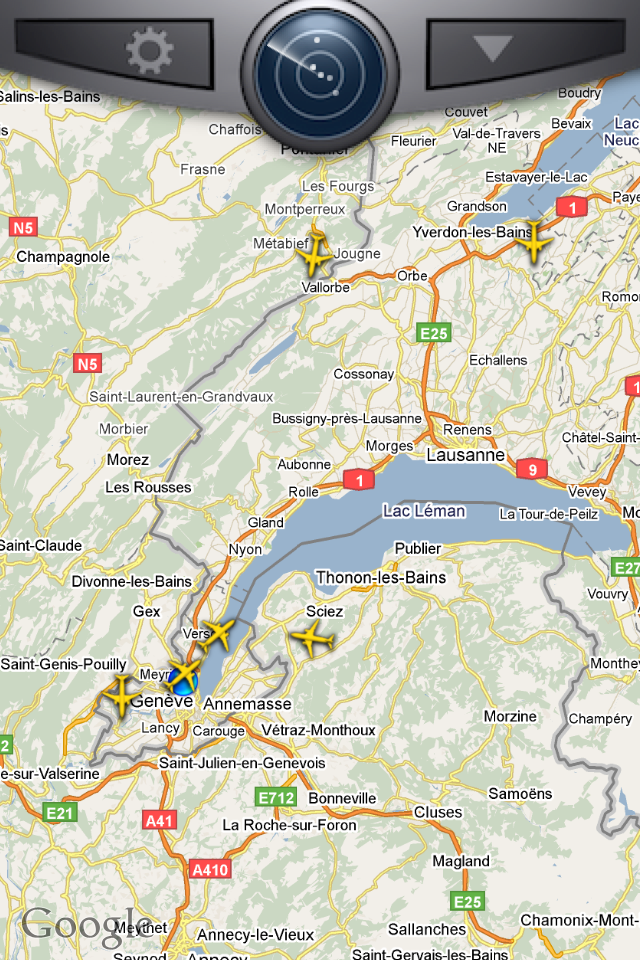
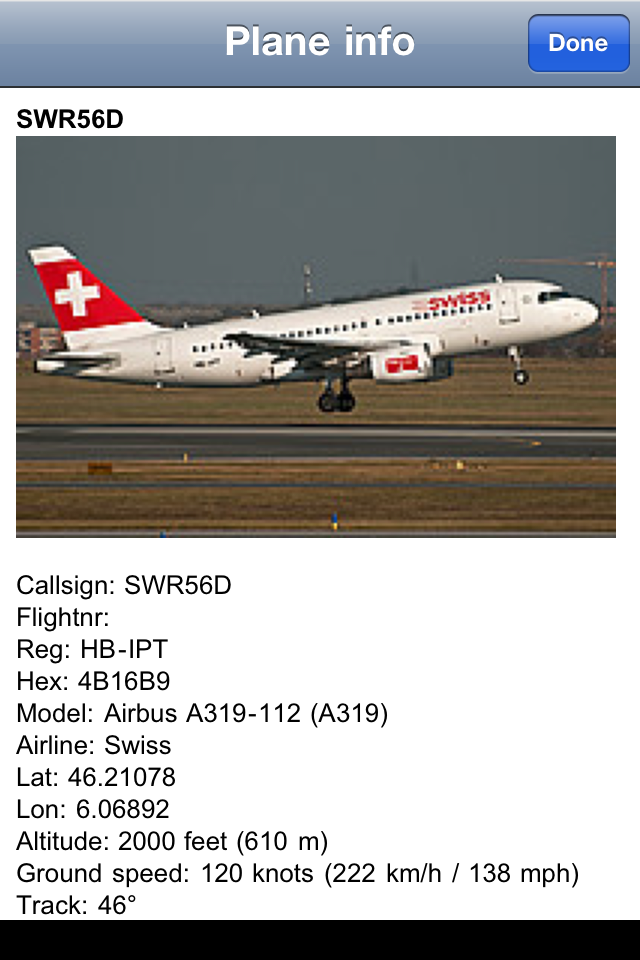
Flight radar 24 is an iphone app that allows you to see where aircraft are on google maps. It shows the callsign, registration, altitude and a lot more. It is a fun app for plane spotters. [caption id=“attachment_1326” align=“aligncenter” width=“200” caption=“Planes approaching Geneva airport”]Planes approaching Geneva airport[/caption] Sit on a city roof or at the top of a mountain and as you see a plane fly above you you will know where it’s coming from and where it’s going. Next time I have to pick someone up at the airport I will be using the flight tracker to know exactly where the plane is. Boredom will be of a different type. [caption id=“attachment_1327” align=“aligncenter” width=“200” caption=“Flight information”]Flight information[/caption] The information about what the plane is doing is quite complete. The only thing missing would be a live radio feed of the ATC communications.

Blackberry torch as a new toy.

Blackberry is the latest phone operating system I have played with. So far my impressions of the OS are not that favourable. In particular what confuses me is the inability to setup the mail client, twitter and facebook out of the box as I can do with symbian, android, iOS and one or two other mobile platforms. What I do like is that the battery is meant to last a long time. I have a virtual and physical keyboard and I quite like optical scrolling. ¨ We will see how long it takes before I feel at home with this new operating system.

NewsRack

For a while I have been looking for an external feedreader for reading the items collecting and stagnating in google reader. Yesterday I came across Newsrack and what I like is that it syncs instantly with the online version. As a result I can read the feeds on the macbook air when I am at home and out and about or I can read the feeds in browser when I am at work. Look at the sync tab in the settings and you can select to sync starred, shared and shared by friends articles according to All/week/month/3 months. As a result you control how many items come in. You can select how quickly read articles are deleted. On the laptop I have set this to immediately after reading. As long as I have the articles online I’m happy. Sharing is to all the usual places, e-mail, twitter, instapaper, readitlater, delicious and of course google reader. In this case memorise the shortcut commands and you can do this without bothering with the mouse. Scrolling through articles is easy. Left and right goes from the feed view to the article and vice versa. The down key lets you go through the articles, click the right arrow and you can read the article. This allows for a rapid feedreading process. The weakness I have has to do with the way keywords are dealt with. I would like an option to hide them from the RSS feed view. I just want to see the actual feeds, not all the sub themes. I hope they give us the option of choice in future versions. I have only used the application for a few hours but so far I am happy with it. It’s not free but it’s only a tiny bit more expensive than a coke in Geneva’s old town.

The small matter of Cairo

What makes the situation in Cairo so interesting is the number of media outlets that you can use as sources. From 24 hour news channels like France 24, Al Jazeera, BBC World and others to individual people with mobile phones. For France 24 you have three languages to chose from, with Al Jazeera to you have three languages to chose from. With Sky News you have the choice between Standard definition and High definition. You have live cameras looking into the square. There is no lag time between the acquisition and distribution of images. There is the challenge of aquiring images from the ground though. Journalists have been attacked, as reported on twitter, and through interviews once they arrive in their home countries. Tweets have told us of arrests of certain individuals, of attacks on certain media offices etc. It means that whilst those within the country may not have access to this information we on the outside see it. One of the aspects that is so interesting is the way in which people have been able to organise themselves. Facebook, twitter and other social websites have been important, like Bambuser and flickr. Mainstream as well. I am looking forward to the literature that will come out from this event, especially if it successful. Imagine comparing a situation like that of Tomas in “The Unbearable Lightness of Being” to this situation, especially if the end result is greater freedom.
Jaiku is back

Remember Jaiku? it’s that site that was compared to twitter and behaved like friendfeed before friendfeed existed. Over the last two days activity has increased on that site as at least twenty people go back to communicating on the site. It’s a throw back to a community that had been quite lively. Online communities are funny in the way they cluster back to a place where they used to be. It’s like a migration but of an electronic kind. Does this mean I’ll have to pull out the N95 and use jaiku from there? We’ll have to see.

Glympse and real time location sharing

Glympse is a real time location software that allows you to share your location with twitter, facebook, by e-mail or via a number of other social networks. It is simple and intuitive to use. Connect your facebook, twitter and other services with the application. When you are heading to work or to the mountains for a ski trip you can start to share your location in real time. You can set the amount of time that the location is shared. This is better than google latitude, foursquare and other services because it requires nothing from the receiver of this location sharing offer. Instead they simply click a link and they are kept up to date with your location progress. The flexibility of this service gives the user good control therefore fearing for your privacy is not so relevant. What I would like to see in future versions is the ability to play back the route we have taken. I would like to playback the train trip from one city in Switzerland for example.

Skiing for a change

Skiing images from last year.

[flickr-gallery mode=“photoset” photoset=“72157625574004661”]